

Every Order Type Explained – And Where Each One Fails You

Read Time: 6 minutes
Most traders pick an order type once, early on, and never think about it again. Market order to get in, stop loss to get out, done.
It works until it doesn't. Then a stop fills forty pips below where it was set, or a limit entry sits untouched while price runs away without you, and the order type stops being a formality and becomes the whole story.
Every order type buys you certainty on one thing and gives it up on another. Knowing which one is which is the difference between being surprised by your fills and expecting them.
- Market orders
- Limit orders
- Stop orders
- Stop-limit orders
- Trailing stops
- One Cancels the Other (OCO) orders
- Choosing between the different order types
A market order says: ‘get me in now, at whatever the market is offering’.
It's the only order type that guarantees execution. You will get filled. What you won't get is a guaranteed price – you take whatever's available when your order reaches the market.
Where it fails you: in fast or thin conditions. During a data release, or in the first minutes after the weekend open, the price you clicked and the price you got can differ meaningfully. That difference is slippage, and it can run either way, though it tends to run against you when volatility spikes because that's when the book thins out.
Market orders suit situations where being in the trade matters more than the exact entry – and they're the wrong tool thirty seconds before Non-Farm Payrolls.
A limit order says: get me in at this price or better, and I'll wait.
A buy limit sits below the current price. A sell limit sits above it. You're asking for a more favourable price than the market is currently offering, which is why you have to wait for the market to come to you.
You get price certainty. You give up fill certainty.
Where it fails you: the trade you were right about happens without you. Price gets within two pips of your limit, reverses, and runs three hundred pips in your intended direction. Your analysis was correct and you made nothing.
The second failure is subtler. Limit orders fill when the market moves through your level – which often means someone was willing to sell to you at that price for a reason. Getting filled easily on a limit order isn't always good news.
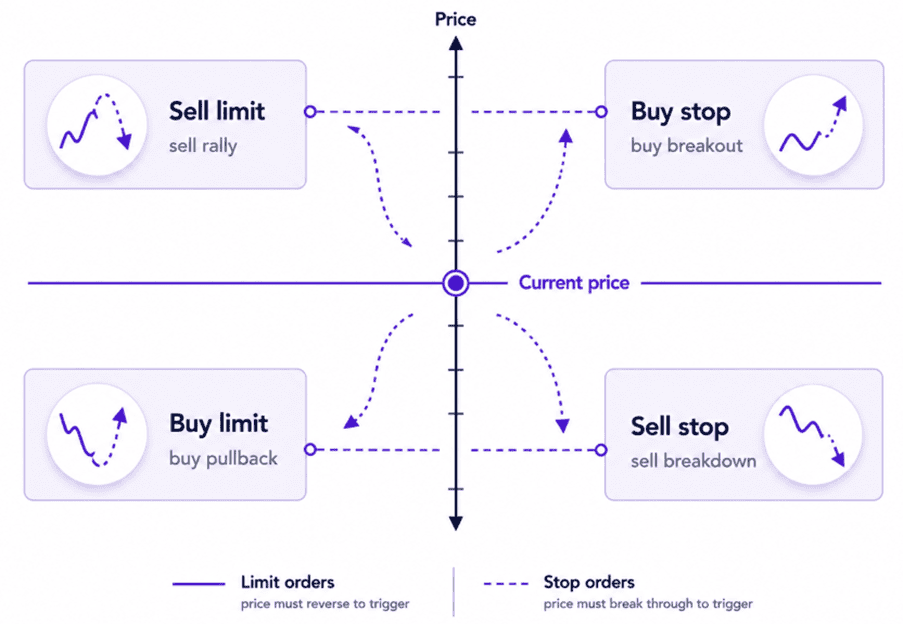
Image 1: Order placements
Here's the one that catches people out, so it's worth being precise.
A stop order is an instruction that becomes a market order the moment your trigger price is touched. It is not a limit order. It carries no price protection at all.
Stops work in two directions:
- A stop loss exits a position when price moves against you.
- A stop entry (buy stop above the market, sell stop below it) enters on a breakout, once price confirms the move.
Where it fails you: gaps and fast markets. Your stop is set at 1.0850. Price gaps from 1.0870 to 1.0805 over the weekend, or on a shock headline. Your stop triggers and becomes a market order, and you're filled at 1.0805. The stop did exactly what it was designed to do – it just couldn't do it at your price, because there was no trading at your price.
This is why "my broker hunted my stop" is usually the wrong diagnosis. A triggered stop becomes a market order, and market orders take what the book offers. We've covered the arithmetic of what those losses actually cost you in Drawdown Maths: The True Cost of Losses.
A stop-limit tries to solve the gap problem. When your stop price is touched, it places a limit order rather than a market order, at a price you nominate.
You set a stop at 1.0850 and a limit at 1.0840. If price trades through 1.0850, an order to sell at 1.0840 or better goes into the market. If price is gapping through 1.0805, that limit never fills.
Where it fails you: exactly there. You've protected yourself against a bad fill by accepting the possibility of no fill – which, on a stop loss, means still holding a losing position in a market that's moving against you. Stop-limits are reasonable for entries. As an exit, using one means deciding you'd rather stay in a runaway trade than take a poor price, and that's rarely the trade-off people think they're making.
A trailing stop follows price at a fixed distance as the trade moves in your favour, and holds its position when price moves against you. It ratchets one way only.
Set a fifty-pip trailing stop on a long and the stop moves up as price makes new highs, locking in progressively more. It never moves back down.
Where it fails you: three ways. Set it too tight and normal noise takes you out before the move develops. Set it too wide and you hand back most of the open profit before it triggers. And on some platforms the trail is calculated in your terminal rather than on the broker's server – close the platform, and the stop stops trailing. Check which applies to yours, because it's one of the more common reasons traders run a Virtual Private Server (VPS).
The distance is the whole decision, and it should be set against current volatility rather than a round number you like.
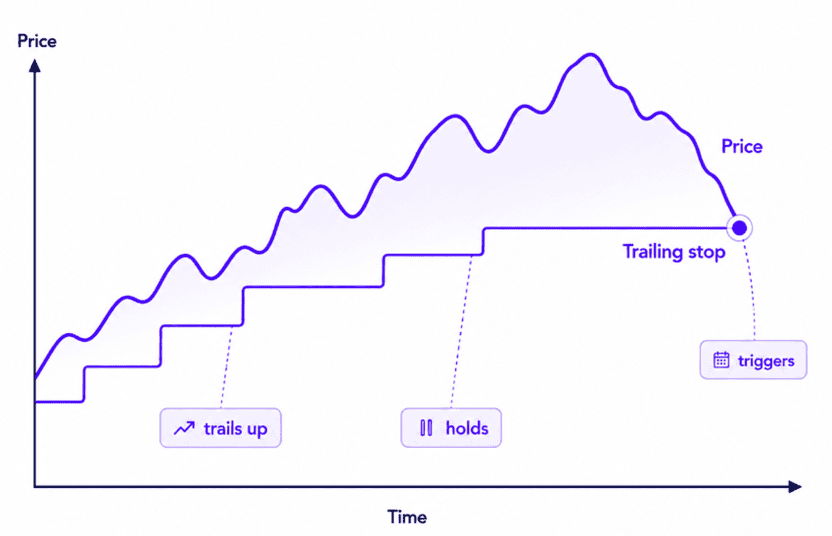
Image 2: Trailing stop ratchet
One Cancels the Other links two pending orders. When one fills, the other is automatically removed.
The classic use is bracketing a range: a buy stop above resistance, a sell stops below support, and whichever triggers cancels its twin. It's also used to attach a take profit and a stop loss to an open position, so closing at either level cleans up the other.
Where it fails you: OCO isn't universal. Some platforms support it natively, others don't, and on those you'll need to manage the pairing yourself or accept the risk of an orphaned order sitting in the market after your position has closed. That orphan is how traders find themselves accidentally long after a trade they thought was finished.
The four pending orders, side by side
| Order | Sits where | You're expecting | Fill certainty | Price certainty |
|---|---|---|---|---|
| Buy limit | Below market | A pullback to buy into | No | Yes |
| Sell limit | Above market | A rally to sell into | No | Yes |
| Buy stop | Above market | A breakout upward | Yes (as market order) | No |
| Sell stop | Below market | A breakdown | Yes (as market order) | No[DW1] |
The pattern is consistent: limits give you price and withhold execution, stops give you execution and withhold price. There is no order type that gives you both, and any strategy that quietly assumes one exists will eventually find out.
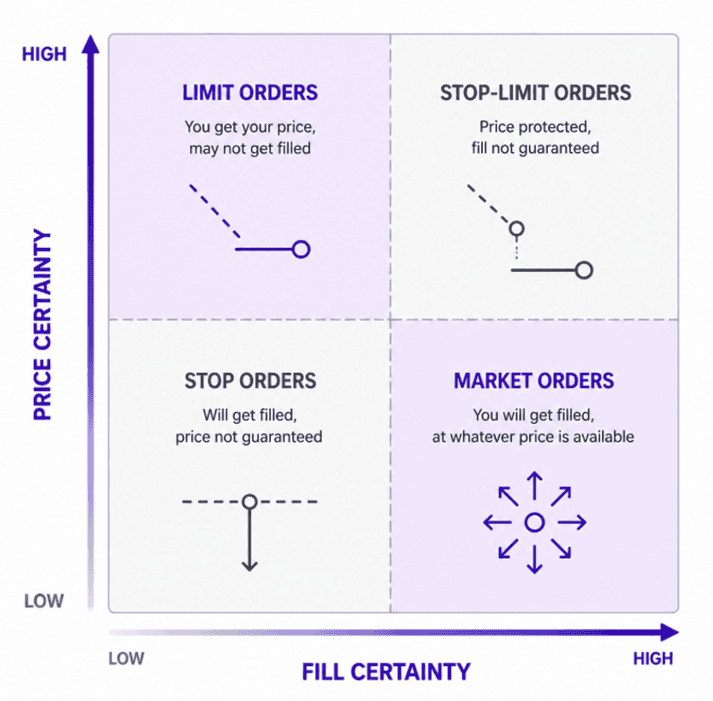
Image 3: Trade-off matrix
A short version of the logic:
- Entry on a level you've identified in advance = limit order and accept you'll miss some.
- Entry on confirmation or a breakout = stop entry and accept some slippage.
- Entry when the setup is live right now = market order, outside major news windows.
- Exit to protect capital = stop loss, always, and size the position knowing the fill may be worse than the level.
- Exit to protect open profit = trailing stop, distance set to volatility.
The last point matters most. Because stops don't guarantee price, your position size has to be survivable at a fill worse than your stop – not merely at the stop itself. Fusion's trading calculators will do that arithmetic before you place the trade.
We’ll never share your email with third-parties. Opt-out anytime.